<?xml version="1.0" encoding="utf-8"?>
<feed xmlns="http://www.w3.org/2005/Atom">
  <title>spaghetti.dev</title>
  
  <subtitle>Spaghetti recipes for Salesforce development</subtitle>
  <link href="https://spaghetti.dev/atom.xml" rel="self"/>
  
  <link href="https://spaghetti.dev/"/>
  <updated>2024-01-10T08:12:21.691Z</updated>
  <id>https://spaghetti.dev/</id>
  
  <generator uri="https://hexo.io/">Hexo</generator>
  
  <entry>
    <title>Unlocked packages and GitHub Actions</title>
    <link href="https://spaghetti.dev/Unlocked-packages-and-GitHub-actions/"/>
    <id>https://spaghetti.dev/Unlocked-packages-and-GitHub-actions/</id>
    <published>2021-03-01T11:34:01.000Z</published>
    <updated>2024-01-10T08:12:21.691Z</updated>
    
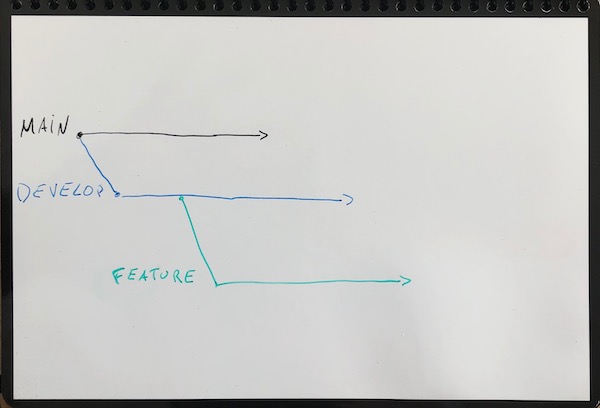
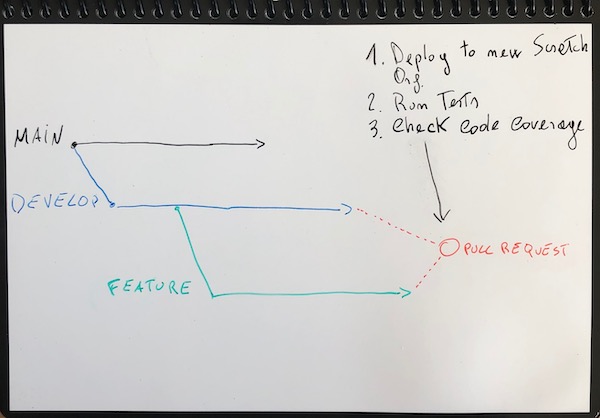
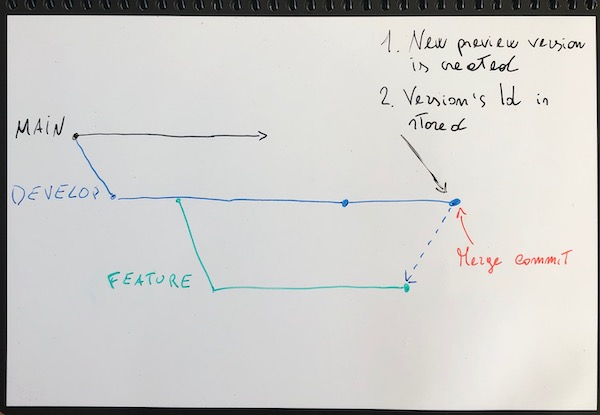
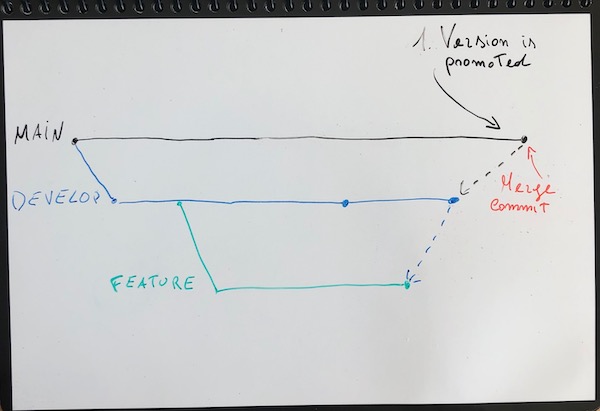
    <content type="html"><![CDATA[<p>In this post I’d like to discuss the CI/CD pipeline setup I made for this Salesforce project <a href="https://github.com/maaaaarco/spaghetti-cmd-loader">spaghetti-cmd-loader</a> where I use <em>Unlocked packages</em> and <em>GitHub Actions</em>. I also explain which branching strategy I picked, the package release process and few things I always like to consider when designing this kind of pipelines.</p><p><em>If you are already familiar with these topics and are only interested in the GitHub Actions setup you can jump to <a href="#CI-CD-pipeline">CI/CD pipeline</a>.</em></p><h2 id="Quick-intro"><a href="#Quick-intro" class="headerlink" title="Quick intro"></a>Quick intro</h2><p><a href="https://github.com/maaaaarco/spaghetti-cmd-loader">spaghetti-cmd-loader</a> is a Salesforce application I wrote last year (2020) that allows users to load <em>Custom Metadata Type</em> records from a CSV file. My aim at that time was to provide a more user friendly and nice looking tool compared to the older <a href="https://github.com/forcedotcom/CustomMetadataLoader">CustomMetadataLoader</a>.</p><h2 id="Salesforce-setup"><a href="#Salesforce-setup" class="headerlink" title="Salesforce setup"></a>Salesforce setup</h2><p>I’m using my personal <a href="https://developer.salesforce.com/signup">Developer Edition</a> Org as DevHub to create new Scratch Orgs and to maintain the package’s version history. I also registered the namespace <code>spaghettiCMD</code> to prevent deployment issues that might arise due to conflicting API names. More on how to register a namespace in this <a href="https://developer.salesforce.com/docs/atlas.en-us.sfdx_dev.meta/sfdx_dev/sfdx_dev_dev2gp_create_namespace.htm">Help article</a>.</p><h2 id="Branching-strategy"><a href="#Branching-strategy" class="headerlink" title="Branching strategy"></a>Branching strategy</h2><p>My branching strategy is based on <a href="https://www.atlassian.com/git/tutorials/comparing-workflows/gitflow-workflow">GitFlow</a> however I use only two main branches:</p><ul><li><code>main</code>, to release new package versions</li><li><code>develop</code>, to integrate features, test and validate package versions before releasing them</li></ul><p>and only one kind of individual branch:</p><ul><li><code>feature</code>, to develop new features or bugfixes</li></ul><p>This is a visual representation of my strategy:</p><img src="/Unlocked-packages-and-GitHub-actions/strategy.jpeg" class="" width="600" height="400" title="strategy " alt="strategy"><h2 id="Release-process"><a href="#Release-process" class="headerlink" title="Release process"></a>Release process</h2><p>The release process is pretty straightforward and can be summarized in four steps:</p><ol><li>The content of <code>feature</code> branches must be validated before it can be merged into the <code>develop</code> branch.</li><li>Every time new changes are merged into the <code>develop</code> branch a new package version is created. This version cannot be installed in Production Organizations.</li><li>Every time new changes are merged into the <code>main</code> branch the latest package version is promoted so it can be installed in Production Organization.</li><li>After a version is promoted a new release cycle begins by updating the version’s number inside the <code>sfdx-project.json</code> file and pushing it on the <code>develop</code> branch.</li></ol><h3 id="Validate-features"><a href="#Validate-features" class="headerlink" title="Validate features"></a>Validate features</h3><p>To validate the changes made in <code>feature</code> branches every time a Pull Request (from: <code>feature/xyz</code> to: <code>develop</code>) is opened or updated the entire content of the branch is deployed into a <strong>new</strong> Scratch Org. If the deployment is successful then all Apex test classes are executed to ensure that the overall code coverage is at least 75%. If any of these two steps (deploy and/or tests) fail then the Pull Request cannot be merged.</p><img src="/Unlocked-packages-and-GitHub-actions/feature.jpeg" class="" width="600" height="400" title="feature " alt="feature"><h3 id="Preview-version"><a href="#Preview-version" class="headerlink" title="Preview version"></a>Preview version</h3><p>A new package version is generated every time a <em>push</em> is made on the <code>develop</code> branch (this also applies when merging a Pull Request). When creating a new version the overall code coverage is calculated and checked again to ensure that is at least 75%. If the creation is successful then two things happen: </p><ol><li>The version is deployed to a dedicated environment like a Sandbox or another Developer Org where it can be tested (keep in mind that this is a <em>preview</em> version and cannot be deployed to a real Production org)</li><li>The version’s Id <em>(the one that looks like this 04txxxxxxxxx)</em> is stored in the repository within the content of the <code>sfdx-project.json</code> file</li></ol><p>Another thing to keep in mind is that there’s a limit on the number of <em>preview</em> versions you can generate within 24 hours which depends on your DevHub’s edition.</p><img src="/Unlocked-packages-and-GitHub-actions/preview.jpeg" class="" width="600" height="400" title="preview " alt="preview"><h3 id="Promote-preview-version"><a href="#Promote-preview-version" class="headerlink" title="Promote preview version"></a>Promote preview version</h3><p>A version is promoted when the <code>develop</code> branch is merged into the <code>main</code> branch. The package version that gets promoted is the latest one stored in the <code>sfdx-project.json</code> file. After that a new <a href="https://git-scm.com/book/en/v2/Git-Basics-Tagging">git tag</a> is generated to mark the release point in the <code>main</code> branch. Promoting a package’s version allows for deployment in real Production Organizations. Keep in mind that a <em>preview</em> version cannot be promoted if it does not meet the minimum code coverage requirement (75%). This is why I constantly check for this value during the release process.</p><img src="/Unlocked-packages-and-GitHub-actions/promote.jpeg" class="" width="600" height="400" title="promote " alt="promote"><h3 id="Release-cycle"><a href="#Release-cycle" class="headerlink" title="Release cycle"></a>Release cycle</h3><p>To begin a new release cycle the package version’s number has to be incremented. Version’s number follows the <a href="https://semver.org/">Semantic Versioning</a> and it is stored inside the <code>sfdx-project.json</code> file under the <code>packageDirectories</code> property:</p><figure class="highlight json"><table><tr><td class="code"><pre><span class="line">...</span><br><span class="line"><span class="attr">&quot;packageDirectories&quot;</span><span class="punctuation">:</span> <span class="punctuation">[</span></span><br><span class="line">        <span class="punctuation">&#123;</span></span><br><span class="line">            <span class="attr">&quot;path&quot;</span><span class="punctuation">:</span> <span class="string">&quot;cmd-loader&quot;</span><span class="punctuation">,</span></span><br><span class="line">            <span class="attr">&quot;default&quot;</span><span class="punctuation">:</span> <span class="literal"><span class="keyword">true</span></span><span class="punctuation">,</span></span><br><span class="line">            <span class="attr">&quot;package&quot;</span><span class="punctuation">:</span> <span class="string">&quot;Spaghetti CMD&quot;</span><span class="punctuation">,</span></span><br><span class="line">            <span class="attr">&quot;versionName&quot;</span><span class="punctuation">:</span> <span class="string">&quot;ver 1.2&quot;</span><span class="punctuation">,</span> </span><br><span class="line">            <span class="attr">&quot;versionNumber&quot;</span><span class="punctuation">:</span> <span class="string">&quot;1.2.1.NEXT&quot;</span></span><br><span class="line">        <span class="punctuation">&#125;</span></span><br><span class="line">    <span class="punctuation">]</span><span class="punctuation">,</span></span><br><span class="line">...</span><br></pre></td></tr></table></figure><p>Salesforce prevents you to promote the same <em>MAJOR.MINOR</em> version twice so at least the <em>MINOR</em> number has to increment. I decided not to automate this step yet to have more control on version numbers.</p><h2 id="CI-CD-pipeline"><a href="#CI-CD-pipeline" class="headerlink" title="CI/CD pipeline"></a>CI/CD pipeline</h2><p>Time to dive into how I automate everything I discussed until now using GitHub Actions.</p><blockquote><p>GitHub Actions is available with GitHub Free, GitHub Pro, GitHub Free for organizations, GitHub Team, GitHub Enterprise Cloud, GitHub Enterprise Server, GitHub One, and GitHub AE. GitHub Actions is not available for private repositories owned by accounts using legacy per-repository plans.</p><footer><strong>GitHub Docs:</strong><cite><a href="https://docs.github.com/en/actions/guides/about-continuous-integration">docs.github.com/en/actions/guides/about-continuous-integration</a></cite></footer></blockquote><p>Since I’m using my personal GitHub Free account I have a quota of 2000 minutes per month which is more than enough. You can check your quota by logging in with your account and then go to <a href="https://github.com/settings/billing">Settings &gt; Billing &amp; plan</a>. The setup for GitHub Actions is quite easy, the configuration files are written in YAML and must be placed in this specific folder within your repository <code>.github/workflows</code>. Every file identifies a specific workflow in your process. I created three main workflows:</p><figure class="highlight sh"><table><tr><td class="code"><pre><span class="line">.github</span><br><span class="line">└── workflows</span><br><span class="line">    ├── pr-develop.yml</span><br><span class="line">    ├── push-develop.yml</span><br><span class="line">    └── push-main.yml</span><br></pre></td></tr></table></figure><p>The names are self explanatory but anyhow this is a quick overview of what they do:</p><ul><li><code>pr-develop</code>, runs for Pull Requests on the <code>develop</code> branch and validates changes that are part of <code>feature</code> branches</li><li><code>push-develop</code>, runs on every <em>push</em> on the <code>develop</code> branch and creates a new package <em>preview</em> version</li><li><code>push-main</code>, runs on every <em>push</em> on the <code>main</code> branch and promotes the latest package version</li></ul><h3 id="Pull-Requests-workflow"><a href="#Pull-Requests-workflow" class="headerlink" title="Pull Requests workflow"></a>Pull Requests workflow</h3><p><a href="https://github.com/maaaaarco/spaghetti-cmd-loader/blob/main/.github/workflows/pr-develop.yml">pr-develop.yml</a></p><p>At the beginning of the file I specify on which event this workflow will run:</p><figure class="highlight yml"><table><tr><td class="code"><pre><span class="line"><span class="attr">name:</span> <span class="string">Pull</span> <span class="string">Request</span> <span class="string">to</span> <span class="string">Develop</span></span><br><span class="line"></span><br><span class="line"><span class="attr">on:</span></span><br><span class="line">  <span class="attr">pull_request:</span></span><br><span class="line">    <span class="attr">branches:</span> [ <span class="string">develop</span> ]</span><br></pre></td></tr></table></figure><p>Next I define the single job that will execute as part of this workflow:</p><figure class="highlight yml"><table><tr><td class="code"><pre><span class="line"><span class="attr">jobs:</span></span><br><span class="line">  <span class="attr">validate_pull_request:</span></span><br><span class="line">    <span class="attr">runs-on:</span> <span class="string">ubuntu-latest</span></span><br><span class="line"></span><br><span class="line">    <span class="attr">steps:</span></span><br><span class="line">      <span class="bullet">-</span> <span class="attr">uses:</span> <span class="string">actions/checkout@v2</span></span><br></pre></td></tr></table></figure><ul><li><code>validate_pull_request</code> is the job’s name</li><li><code>runs-on: ubuntu-latest</code> specifies the Operating System my virtual machine will run on</li><li><code>- uses: actions/checkout@v2</code> is the helper module that retrieves the branch content</li></ul><p>In the first two steps of this job I install all the tools I need:</p><ul><li><a href="https://developer.salesforce.com/docs/atlas.en-us.sfdx_setup.meta/sfdx_setup/sfdx_setup_install_cli.htm">Salesforce CLI</a>, pretty obvious why ;)</li><li><a href="https://stedolan.github.io/jq/">jq</a>, to parse the JSON output of the CLI. When implementing these automation <strong>always</strong> rely on the JSON output of the CLI and <strong>never</strong> on the <em>human readable</em> one!</li></ul><figure class="highlight yml"><table><tr><td class="code"><pre><span class="line"><span class="bullet">-</span> <span class="attr">name:</span> <span class="string">Install</span> <span class="string">Salesforce</span> <span class="string">CLI</span></span><br><span class="line">  <span class="attr">run:</span> <span class="string">|</span></span><br><span class="line"><span class="string">    wget https://developer.salesforce.com/media/salesforce-cli/sfdx-linux-amd64.tar.xz</span></span><br><span class="line"><span class="string">    mkdir sfdx-cli</span></span><br><span class="line"><span class="string">    tar xJf sfdx-linux-amd64.tar.xz -C sfdx-cli --strip-components 1</span></span><br><span class="line"><span class="string">    ./sfdx-cli/install</span></span><br><span class="line"><span class="string"></span>  </span><br><span class="line"><span class="bullet">-</span> <span class="attr">name:</span> <span class="string">Install</span> <span class="string">jq</span></span><br><span class="line">  <span class="attr">run:</span> <span class="string">|</span></span><br><span class="line">    <span class="string">sudo</span> <span class="string">apt-get</span> <span class="string">install</span> <span class="string">jq</span></span><br></pre></td></tr></table></figure><p>I now proceed to authenticate the CLI with my DevHub org.<br>I’m using the <em>sfdxurl</em> flow as authentication mechanism since it’s much simpler compared to the <em>JWT</em> one where you have to configure a <em>Connected App</em> in your DevHub, generate an SSL certificate and store the encrypted private key in the repository. To obtain the authentication URL for your DevHub run this command from your laptop:</p><figure class="highlight shell"><table><tr><td class="code"><pre><span class="line"><span class="meta prompt_">$ </span><span class="language-bash">sfdx force:org:display --targetusername=YOUR_DEVHUB_USERNAME --verbose</span> </span><br><span class="line"></span><br><span class="line">=== Org Description</span><br><span class="line">KEY            VALUE</span><br><span class="line">──────────────────────────</span><br><span class="line">...</span><br><span class="line">Sfdx Auth Url  force://PlatformCLI:: - redacted -</span><br><span class="line">...</span><br></pre></td></tr></table></figure><p>Store the value for <code>Sfdx Auth Url</code>  as a <em>secret</em> in your repository by following this simple <a href="https://docs.github.com/en/actions/reference/encrypted-secrets#creating-encrypted-secrets-for-a-repository">guide</a> and give it a name (in my case <code>DEVHUB_SFDX_URL</code>). </p><figure class="highlight plaintext"><table><tr><td class="code"><pre><span class="line">- name: Populate auth file</span><br><span class="line">  shell: bash</span><br><span class="line">  run: &#x27;echo $&#123;&#123; secrets.DEVHUB_SFDX_URL &#125;&#125; &gt; ./DEVHUB_SFDX_URL.txt&#x27;</span><br><span class="line">  </span><br><span class="line">- name: Authenticate Dev Hub</span><br><span class="line">  run: &#x27;sfdx force:auth:sfdxurl:store -f ./DEVHUB_SFDX_URL.txt -a devhub -d&#x27;</span><br></pre></td></tr></table></figure><p>The first step retrieves the encrypted secret, decrypts it and stores it in a text file. The second one references the file to authenticate with the DevHub. Once the CLI is authenticated with the DevHub I create a new Scratch Org and push the content of the repository in it.</p><figure class="highlight yml"><table><tr><td class="code"><pre><span class="line"><span class="bullet">-</span> <span class="attr">name:</span> <span class="string">Create</span> <span class="string">scratch</span> <span class="string">org</span></span><br><span class="line">  <span class="attr">run:</span> <span class="string">&#x27;sfdx force:org:create -f config/project-scratch-def.json -a ci_scratch -s -d 1&#x27;</span></span><br><span class="line">    </span><br><span class="line"><span class="bullet">-</span> <span class="attr">name:</span> <span class="string">Push</span> <span class="string">source</span> <span class="string">to</span> <span class="string">scratch</span> <span class="string">org</span></span><br><span class="line">  <span class="attr">run:</span> <span class="string">&#x27;sfdx force:source:push&#x27;</span></span><br></pre></td></tr></table></figure><p>If the deployment is successful I run all test classes to check that the code coverage requirement is met:</p><figure class="highlight yml"><table><tr><td class="code"><pre><span class="line"><span class="bullet">-</span> <span class="attr">name:</span> <span class="string">Check</span> <span class="string">code</span> <span class="string">coverage</span></span><br><span class="line">  <span class="attr">run:</span> <span class="string">|</span></span><br><span class="line"><span class="string">    sfdx force:apex:test:run --codecoverage --resultformat json --synchronous --testlevel RunLocalTests --wait 10 &gt; tests.json</span></span><br><span class="line"><span class="string">    coverage=$(jq .result.summary.orgWideCoverage tests.json | grep -Eo &quot;[[:digit:]]+&quot;)</span></span><br><span class="line"><span class="string">    test $coverage -ge 75</span></span><br></pre></td></tr></table></figure><p>Finally at the end I delete the Scratch Org:</p><figure class="highlight yml"><table><tr><td class="code"><pre><span class="line"><span class="bullet">-</span> <span class="attr">name:</span> <span class="string">Delete</span> <span class="string">scratch</span> <span class="string">org</span></span><br><span class="line">  <span class="attr">if:</span> <span class="string">always()</span></span><br><span class="line">  <span class="attr">run:</span> <span class="string">&#x27;sfdx force:org:delete -p -u ci_scratch&#x27;</span></span><br></pre></td></tr></table></figure><p>I always execute this step also in case of errors because there is a limit on the number of active Scratch Org. This limit depends on the edition of your DevHub and you can check it by running this command:</p><figure class="highlight shell"><table><tr><td class="code"><pre><span class="line"><span class="meta prompt_">$ </span><span class="language-bash">sfdx force:limits:api:display --targetusername=YOUR_DEVHUB_USERNAME</span></span><br><span class="line">Name                                         Remaining  Max</span><br><span class="line">───────────────────────────────────────────  ─────────  ─────────</span><br><span class="line">ActiveScratchOrgs                            3          3</span><br><span class="line">DailyScratchOrgs                             6          6</span><br></pre></td></tr></table></figure><ul><li><code>ActiveScratchOrgs</code> is the limit of active Scratch Org related to your DevHub. This limit is static and does not reset.</li><li><code>DailyScratchOrgs</code> is the maximum amount of Scratch Org you can create in 24h. This limit is dynamic and resets every day.</li></ul><h3 id="Develop-branch-workflow"><a href="#Develop-branch-workflow" class="headerlink" title="Develop branch workflow"></a>Develop branch workflow</h3><p><a href="https://github.com/maaaaarco/spaghetti-cmd-loader/blob/main/.github/workflows/push-develop.yml">push-develop.yml</a></p><p>At the beginning of the file I specify on which event this workflow will run:</p><figure class="highlight yml"><table><tr><td class="code"><pre><span class="line"><span class="attr">name:</span> <span class="string">Create</span> <span class="string">pre-release</span> <span class="string">version</span></span><br><span class="line"></span><br><span class="line"><span class="attr">on:</span></span><br><span class="line">  <span class="attr">push:</span></span><br><span class="line">    <span class="attr">branches:</span> [ <span class="string">develop</span> ]</span><br></pre></td></tr></table></figure><p>The next steps are the same as explained before (job’s name, operating system, DevHub authentication, …) so I’ll skip them and jump directly to the package version creation:</p><figure class="highlight yml"><table><tr><td class="code"><pre><span class="line"><span class="bullet">-</span> <span class="attr">name:</span> <span class="string">Create</span> <span class="string">new</span> <span class="string">version</span></span><br><span class="line">  <span class="attr">run:</span> <span class="string">|</span></span><br><span class="line"><span class="string">    sfdx force:package:version:create -x -p &quot;Spaghetti CMD&quot; -w 60 --codecoverage</span></span><br><span class="line"><span class="string">    new_version_id=$(grep -o &quot;04t[[:alnum:]]\&#123;15\&#125;&quot; sfdx-project.json | tail -n1)</span></span><br><span class="line"><span class="string">    echo &quot;version_id=$&#123;new_version_id&#125;&quot; &gt;&gt; $GITHUB_ENV</span></span><br></pre></td></tr></table></figure><p>The <code>force:package:version:create</code> command automatically stores the new version id within the content of <code>sfdx-project.json</code> file. With the next line I extract this value and assign it to a local variable named <code>new_version_id</code>. I then generate an <a href="https://docs.github.com/en/actions/reference/workflow-commands-for-github-actions#setting-an-environment-variable">environment variable</a> named <code>version_id</code> which hold the same value as <code>new_version_id</code> so I can reference it in the next steps.</p><p>If the version is created successfully I proceed to check the code coverage and then install it in my DevHub so I can test it.</p><figure class="highlight yml"><table><tr><td class="code"><pre><span class="line"><span class="bullet">-</span> <span class="attr">name:</span> <span class="string">Check</span> <span class="string">code</span> <span class="string">coverage</span></span><br><span class="line">  <span class="attr">run:</span> <span class="string">|</span></span><br><span class="line"><span class="string">    test $(sfdx force:package:version:report -p &quot;$version_id&quot; --json | jq .result.HasPassedCodeCoverageCheck) = &#x27;true&#x27;</span></span><br><span class="line"><span class="string"></span>  </span><br><span class="line"><span class="bullet">-</span> <span class="attr">name:</span> <span class="string">Install</span> <span class="string">new</span> <span class="string">version</span> <span class="string">in</span> <span class="string">Dev</span> <span class="string">Hub</span></span><br><span class="line">  <span class="attr">run:</span> <span class="string">|</span></span><br><span class="line">    <span class="string">sfdx</span> <span class="string">force:package:install</span> <span class="string">-p</span> <span class="string">&quot;$version_id&quot;</span> <span class="string">-u</span> <span class="string">devhub</span> <span class="string">--wait</span> <span class="number">10</span> <span class="string">--publishwait</span> <span class="number">10</span></span><br></pre></td></tr></table></figure><p>Here you can use any other environment like a Sandbox or another Developer Edition as long as it’s not a real Production Org since the version is still in a <em>preview</em> state.<br>As last step I update the <code>README.md</code> file by replacing the previous package version’s Id with the newly created one and commit both the <code>sfdx-config.json</code> file and the <code>README.md</code> file.</p><figure class="highlight yml"><table><tr><td class="code"><pre><span class="line"><span class="bullet">-</span> <span class="attr">name:</span> <span class="string">Store</span> <span class="string">new</span> <span class="string">version</span> <span class="string">id</span></span><br><span class="line">  <span class="attr">run:</span> <span class="string">|</span></span><br><span class="line"><span class="string">    sed -i -e &quot;s/04t[[:alnum:]]\&#123;15\&#125;/$&#123;version_id&#125;/&quot; README.md</span></span><br><span class="line"><span class="string">    git config user.name &quot;release[bot]&quot;</span></span><br><span class="line"><span class="string">    git config user.email &quot;&lt;&gt;&quot;</span></span><br><span class="line"><span class="string">    git add README.md</span></span><br><span class="line"><span class="string">    git add sfdx-project.json</span></span><br><span class="line"><span class="string">    git commit -m &quot;Updating new pre-release version&quot;</span></span><br><span class="line"><span class="string">    git push</span></span><br></pre></td></tr></table></figure><p>I update the <code>README.md</code> file too because it contains links and instructions to install the package that reference the version id. For example the Sandbox installation URL:</p><ul><li><code>https://test.salesforce.com/packaging/installPackage.apexp?p0=04t1t000003HUFbAAO</code></li></ul><h3 id="Main-branch-workflow"><a href="#Main-branch-workflow" class="headerlink" title="Main branch workflow"></a>Main branch workflow</h3><p><a href="https://github.com/maaaaarco/spaghetti-cmd-loader/blob/main/.github/workflows/push-main.yml">push-main.yml</a></p><p>At the beginning of the file I specify on which event this workflow will run:</p><figure class="highlight yml"><table><tr><td class="code"><pre><span class="line"><span class="attr">name:</span> <span class="string">Publish</span> <span class="string">new</span> <span class="string">release</span></span><br><span class="line"></span><br><span class="line"><span class="attr">on:</span></span><br><span class="line">  <span class="attr">push:</span></span><br><span class="line">    <span class="attr">branches:</span> [ <span class="string">main</span> ]</span><br></pre></td></tr></table></figure><p>Then again I define the job’s name, operating system, install the Salesforce CLI and authenticate the DevHub. After that I promote the latest version’s Id stored in the <code>sfdx-project.json</code> file:</p><figure class="highlight yml"><table><tr><td class="code"><pre><span class="line"><span class="bullet">-</span> <span class="attr">name:</span> <span class="string">Promote</span> <span class="string">latest</span> <span class="string">version</span></span><br><span class="line">  <span class="attr">run:</span> <span class="string">|</span></span><br><span class="line"><span class="string">    version_id=$(grep -o &quot;04t[[:alnum:]]\&#123;15\&#125;&quot; sfdx-project.json | tail -n1)</span></span><br><span class="line"><span class="string">    sfdx force:package:version:promote -p &quot;$version_id&quot; --noprompt</span></span><br></pre></td></tr></table></figure><p>If that’s successful I create a new tag on the <code>main</code> branch to mark the release point:</p><figure class="highlight yml"><table><tr><td class="code"><pre><span class="line"><span class="bullet">-</span> <span class="attr">name:</span> <span class="string">Tag</span> <span class="string">new</span> <span class="string">release</span></span><br><span class="line">  <span class="attr">run:</span> <span class="string">|</span></span><br><span class="line"><span class="string">    tag_name=$(jq &quot;.packageDirectories[0].versionName&quot; sfdx-project.json | tr -d &#x27;&quot;&#x27;| tr -d &#x27; &#x27;)</span></span><br><span class="line"><span class="string">    pkg_name=$(jq &quot;.packageDirectories[0].package&quot; sfdx-project.json | tr -d &#x27;&quot;&#x27;)</span></span><br><span class="line"><span class="string">    git config user.name &quot;release[bot]&quot;</span></span><br><span class="line"><span class="string">    git config user.email &quot;&lt;&gt;&quot;</span></span><br><span class="line"><span class="string">    git tag -a &quot;$tag_name&quot; -m &quot;$pkg_name $tag_name&quot;</span></span><br><span class="line"><span class="string">    git push origin &quot;$tag_name&quot;</span></span><br></pre></td></tr></table></figure><p>With the first two lines I extract the package’s version number and name. I’m then using the version’s number as tag’s name and the package’s name as message for the tag. Having the tag name equals to the package version’s name allows me to quickly identify in GIT at which point in the branch history a specific package was released. </p><figure class="highlight shell"><table><tr><td class="code"><pre><span class="line"><span class="meta prompt_">$ </span><span class="language-bash">git <span class="built_in">log</span> --oneline</span></span><br><span class="line">ed6fa85 (HEAD -&gt; main, origin/main, origin/HEAD) renamed action</span><br><span class="line">e441f7b (tag: ver1.2) Merge pull request #30 from maaaaarco/develop</span><br><span class="line">41f54f6 Updating new pre-release version</span><br><span class="line">7ed40ea Merge pull request #29 from maaaaarco/feature/winter-21</span><br></pre></td></tr></table></figure><p><code>e441f7b</code> is where I released the package version <code>1.2</code>. This could be useful in future if I decide to extend my branching strategy to support <em>hotfix</em> branches as defined in GitFlow.</p>]]></content>


    <summary type="html">&lt;p&gt;In this post I’d like to discuss the CI/CD pipeline setup I made for this Salesforce project &lt;a href=&quot;https://github.com/maaaaarco/spaghe</summary>


    <category term="Salesforce" scheme="https://spaghetti.dev/tags/Salesforce/"/>
    
    <category term="SFDX" scheme="https://spaghetti.dev/tags/SFDX/"/>
    
    <category term="Unlocked packages" scheme="https://spaghetti.dev/tags/Unlocked-packages/"/>
    
    <category term="GitHub Actions" scheme="https://spaghetti.dev/tags/GitHub-Actions/"/>
    
    <category term="CI/CD" scheme="https://spaghetti.dev/tags/CI-CD/"/>
    
  </entry>
  
</feed>